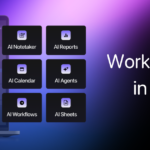
Motion
Motion combines tasks, projects, calendar, docs and meeting notes, and uses AI to schedule your day and keep projects moving.
Key Takeaways
Plan tasks, projects and your calendar with one AI workspace
Free Trial · $19 per user per month · $29 per user per month
- Busy professionals
- Agencies and service businesses
- Team leads and project managers
What is Motion?
Motion is a work app that puts tasks, projects, calendars, docs and meeting notes in one place, with AI handling much of the planning. It looks at priorities, deadlines, durations and dependencies, then builds a daily schedule and reworks it when plans change.
You can describe a project and have Motion draft the tasks, stages, deadlines and assignees. Its meeting notetaker records calls, writes summaries and action items, and can draft follow-up emails. Docs, wikis and SOPs can be turned into tasks or repeatable workflows.
It is aimed at solo professionals and teams of any size, including agencies, consultancies, law firms and startups that juggle many client projects.
Who is Using Motion?
Service businesses
Agencies, consultancies and law firms tracking client projects.
Startups
Small teams that need planning without a dedicated project manager.
Executives
Leaders who want their days and meetings planned for them.
Key Features
- AI Task Planner: Ranks tasks by priority and deadline and builds a schedule that updates itself.
- AI Project Manager: Drafts full projects with tasks, stages, deadlines and assignees from a description.
- AI Calendar: Merges work and personal calendars and books meetings automatically.
- AI Meeting Notetaker: Records meetings and produces summaries, transcripts and action items.
- AI Docs Assistant: Helps draft docs and turns their contents into projects and tasks.
- AI Workflows: Converts SOP documents into repeatable workflows.
Pricing Plans
Pro AI
- Annual billing saves 33%
- AI chat, projects and tasks
- AI calendar and meetings
- AI docs, wiki and notes
- iOS, Android and desktop apps
- 7,500 credits per seat per month
Business AI
- Annual billing saves 33%
- Everything in Pro AI
- Team capacity planning
- Timeline and Gantt charts
- Time tracking and permissions
- 15,000 credits per seat per month
Which Motion plan should you pick?
Pro AI at $19 per seat per month covers tasks, projects, calendar, docs and meetings for individuals and small teams. Choose Business AI at $29 per seat per month if you need capacity planning, Gantt charts, time tracking and access controls.
Professionals and small teams.
Power users and businesses with complex needs.
Motion Use Cases
Daily planning
Let Motion slot tasks into open calendar time.
Outcome: A clear plan for what to work on next.
Project kickoff
Describe a new client project and attach relevant docs.
Outcome: A full task list with owners and dates ready for review.
Meeting follow-up
Have the notetaker join a call.
Outcome: Summary, action items and a follow-up email draft.
How Motion fits into your stack
Forward Gmail, Outlook or iCloud emails to create tasks.
Meetings and chat
Turn Zoom, Meet or Teams meetings and Slack or Teams messages into tasks.
Voice
Add tasks through Siri voice commands.
Pros
- +Automatic scheduling: The AI plans your day and re-plans it when something changes.
- +All-in-one workspace: Tasks, projects, calendar, docs and notes live together.
- +Deadline warnings: Motion flags at-risk tasks ahead of time.
- +Apps everywhere: Includes iOS, Android and desktop apps.
Cons
- −No free plan: Paid plans start after a free trial.
- −Per-seat pricing: Costs grow with every team member added.
- −AI credit limits: Each plan includes a monthly credit allowance per seat.
Limitations & when to consider alternatives
- Credit-based AI. Pro AI includes 7,500 credits per seat per month.
- Advanced features gated. Gantt charts, time tracking and capacity planning need Business AI.
- You want a free task manager with no trial limits.
- You only need a simple to-do list without scheduling.
How to Use Motion
Start a free trial
Sign up on the Motion website.
Connect calendars
Link your work and personal calendars.
Add tasks and projects
Enter work manually, from email, or by describing a project to the AI.
Follow your plan
Work from the schedule Motion builds and let it adjust as things change.
Who is Motion For?
Solo professionals
People who want their task list turned into a realistic schedule.
Growing teams
Teams from a few people to large businesses that need shared planning.
Frequently Asked Questions
Is Motion free?
There is no free plan, but you can start with a free trial and cancel anytime.
How much does Motion cost?
Pro AI is $19 per seat per month and Business AI is $29 per seat per month; paying annually saves 33%.
What does Motion do?
It manages tasks, projects, calendars, docs and meetings, using AI to schedule and prioritize work.
Does Motion have mobile apps?
Yes. Plans include iOS, Android and desktop apps.
Motion Alternatives
Compare allLooking for alternatives to Motion? Here are similar tools in the same category:
 Woebot Health
Chat-based AI support for mental wellness
S
Superhuman
Email, docs, writing help and an AI assistant in one suite
S
SheetAI
Run AI text, image, video and music jobs from Google Sheets
R
Rytr
Keep track of every client and write follow-ups in your voice
Woebot Health
Chat-based AI support for mental wellness
S
Superhuman
Email, docs, writing help and an AI assistant in one suite
S
SheetAI
Run AI text, image, video and music jobs from Google Sheets
R
Rytr
Keep track of every client and write follow-ups in your voice
 Reclaim
AI calendar that schedules focus time, tasks, habits and meetings
Reclaim
AI calendar that schedules focus time, tasks, habits and meetings
 Namelix
Get short, brandable business name ideas from AI
Namelix
Get short, brandable business name ideas from AI
Compare Motion with: Woebot Health Superhuman SheetAI Rytr